
VIDA's user preferences and profile details can accessed via your user profile. You will see your user name next to the user icon. 
Next to your user name, you can select the dropdown icon to get your user menu.
VIDA has both a dark and Light theme, when you first log in VIDA will default to the Dark Theme. The Light theme can be toggled on and off via the Light theme button.
VIDA's Tour guide can take you through the first steps in VIDA such as highlighting your user profile settings.
Via the Settings button, You can access your Profile Settings, such as contact details and enabling Two-factor Authentication.
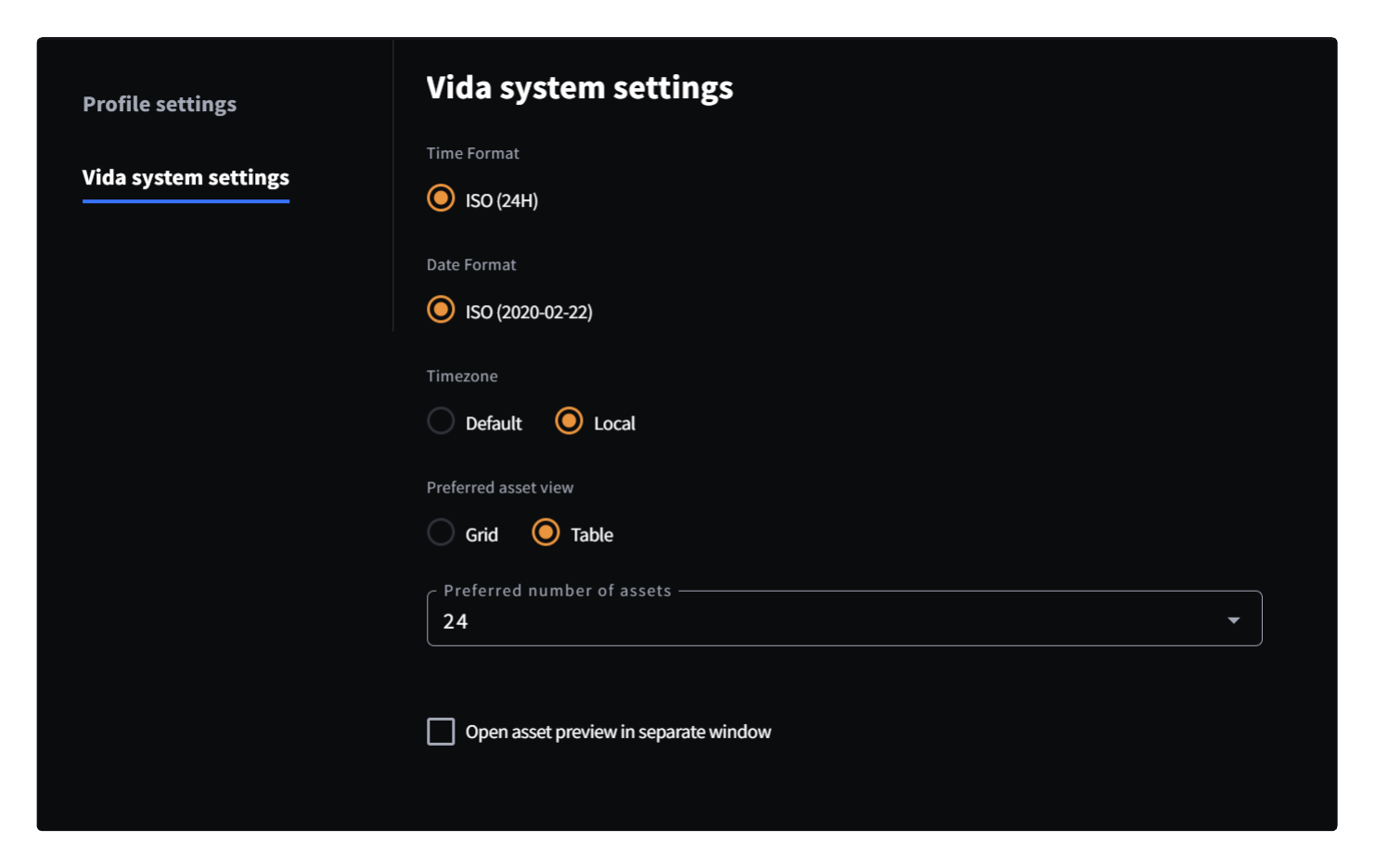
Within the Settings menu, you can also access your VIDA System Settings, you can choose between default and local timezones, and whether you prefer a thumbnail grid on your search results. You can also set the amount of assets you can see per page and if opening an asset open it in a separate window.

Was this article helpful?
That’s Great!
Thank you for your feedback
Sorry! We couldn't be helpful
Thank you for your feedback
Feedback sent
We appreciate your effort and will try to fix the article