Logging in for the First Time
Log in to VIDA, Launchpad, Connect 2 or Storefront using a secure, passwordless sign-in link.
Overview
Before you can log in to VIDA, Launchpad, Connect 2 or Storefront, your account must first be created by your organisation or the VIDA team. Once your account has been set up, you'll receive a notification letting you know it's ready.
All four applications use passwordless authentication. Instead of a password, you'll enter your email address and receive a secure sign-in link.
Before You Begin
- An account already created by your organisation or the VIDA team.
- The login URL for the application you're accessing.
- Access to the email inbox linked to your account, to receive your sign-in link.
Step-by-Step Instructions
- Go to the login URL for the application you're accessing:
- VIDA: app.vida.studio/login
- Launchpad: launchpad.vida.studio/login
- Connect 2: your organisation will provide your customer-specific URL, for example yourcompany.connect2.vida.studio.
- Storefront: your organisation will provide your customer-specific URL.
- Enter your full email address.
- Click Login.
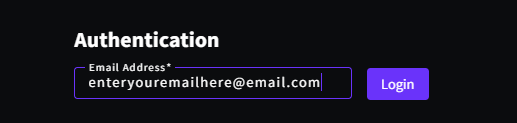
- Check your email for a secure sign-in link.
- Click the link in the email to access the platform.
If you're unsure which URL to use, contact your system administrator or your Customer Success Manager.
Before you can access the platform, you'll need to complete your first-time login and set up Two-Factor Authentication (2FA) on your account. See First-Time Login to VIDA: Setting Up Two-Factor Authentication (2FA) for a step-by-step guide.
Clicking the sign-in link opens the platform. The first time you log in, you'll be guided through setting up 2FA before you can continue — after that, you're taken straight to the application.
You'll then see a short welcome checklist. See Completing Your Onboarding for what each step involves.
Troubleshooting & FAQs
Before attempting to log in, make sure your account has been created by your organisation or the VIDA team. If you're unsure, contact your administrator or the VIDA Support team.
First, check your Spam or Junk folder. If the email isn't there, make sure you've entered the correct email address.
If you're still unable to locate the email, contact the VIDA Support team. In some organisations, email security policies may delay or modify authentication emails.
No. VIDA, Launchpad, Connect 2 and Storefront all use passwordless authentication. Instead of entering a password, you'll receive a secure sign-in link by email each time you log in.
If you're unable to log in after following the steps in this guide:
- Contact your organisation's System Administrator to confirm that your account has been created and that your access has been configured correctly.
- If the issue persists, contact the VIDA Support Team.
To help us investigate, please include:
- The email address you're trying to log in with.
- A screenshot of any error message or the page where you're experiencing the issue.
- The web browser you're using.
- Whether you're accessing VIDA from a corporate network or managed device.
- The local time and date when the issue happened.
Related Articles
Was this article helpful?
That’s Great!
Thank you for your feedback
Sorry! We couldn't be helpful
Thank you for your feedback
Feedback sent
We appreciate your effort and will try to fix the article